A more advanced dashboard
This picks up where Your first dashboard left off, in the same directory, with the conf.yaml,
widgets.yaml and fonts from its last step. By the end, the dashboard makes one request to wttr.in instead of
three, shows an icon for the current weather, switches from today's forecast to tomorrow's in the evening, and only
talks about rain when there's some coming.
Hot reload works for everything on this page, including the new providers.yaml, so you can keep Grydgets running
and send it pkill -USR1 -x grydgets after each change.
1. One request instead of three
At the moment, each of the three readouts asks wttr.in for the same JSON document on its own. A provider makes
the request once and shares the response with every widget that reads from it. Providers go in a third file,
providers.yaml, next to the other two:
providers:
  weather:
    type: rest
    url: 'https://wttr.in/Toronto?format=j1'
    update_interval: 900
weather is the name widgets will use to find it. Note that the option for how often to fetch is called
update_interval here, while on a rest widget it's update_frequency.
The widgets that read from a provider all start with provider. The one that shows text is just called provider,
and it's the counterpart of rest. Replace widgets.yaml with this:
theme:
  defaults:
    dateclock:
      time_font_path: fonts/PTSans-Bold.ttf
      date_font_path: fonts/PTSans-Regular.ttf
    provider:
      font_path: fonts/PTSans-Bold.ttf
    label:
      font_path: fonts/PTSans-Regular.ttf

background_color: '#2e3440'

widgets:
  - widget: grid
    rows: 1
    columns: 2
    padding: 8
    column_ratios: [3, 2]
    children:
      - widget: dateclock
        background_color: '#3b4252'
        corner_radius: 12
        date_color: '#a3afc2'

      - widget: grid
        rows: 3
        columns: 1
        padding: 8
        widget_background_color: '#3b4252'
        widget_corner_radius: 12
        children:
          - widget: label
            text: 'Outside'
            position: below
            text_size: 22
            color: '#a3afc2'
            children:
              - widget: provider
                providers: [weather]
                data_path: 'current_condition[0].temp_C'
                format_string: '{value}°C'
                text_size: 60

          - widget: label
            text: 'Humidity'
            position: below
            text_size: 22
            color: '#a3afc2'
            children:
              - widget: provider
                providers: [weather]
                data_path: 'current_condition[0].humidity'
                format_string: '{value}%'
                text_size: 60

          - widget: label
            text: 'Wind'
            position: below
            text_size: 22
            color: '#a3afc2'
            children:
              - widget: provider
                providers: [weather]
                data_path: 'current_condition[0].windspeedKmph'
                format_string: '{value} km/h'
                text_size: 60
Three things changed on each readout:
urlbecameproviders: [weather]. It's a list, but it only takes one name.json_pathbecamedata_path, which works exactly the same way.format_stringuses{value}whererestused{}.
The rest entry in theme.defaults also became provider, since that's the widget type now.
The dashboard should look exactly like it did at the end of the first tutorial. If a readout shows -- instead of a
number, that's the provider widget's fallback_text: add show_errors: true to it and it'll show the actual error
instead.
2. An icon for the current weather
wttr.in describes the weather with a number called weatherCode: 113 is sunny, 116 is partly cloudy, 296 is light
rain, and so on. The whole list is on the World Weather Online
site, which is where wttr.in gets its
forecasts.
A providerimage widget shows an image from a URL it reads out of the provider data, and that URL can point at a
local file. So if you save the icon for each code in a file named after the code, a single jq expression can turn
the code into the path of its icon, and you never have to write out a table matching codes to pictures.
First, the icons. Meteocons are a lovely free set (MIT licensed) with an icon for pretty much every kind of weather. This downloads the eleven that cover all of wttr.in's codes, and saves a copy of each one for every code it stands for:
mkdir -p images/weather
while read -r icon codes; do
  curl -s "https://cdn.jsdelivr.net/gh/basmilius/weather-icons@2.0.0/design/fill/export/wi_$icon.svg" \
    | sed 's/viewBox="0 0 64 64"/& width="256" height="256"/' > "images/weather/$icon.svg"
  for code in $codes; do
    cp "images/weather/$icon.svg" "images/weather/$code.svg"
  done
done <<'EOF'
clear-day 113
partly-cloudy-day 116
cloudy 119
overcast 122
fog 143 248 260
drizzle 263 266
rain 176 293 296 299 302 305 308 353 356 359
sleet 179 182 185 281 284 311 314 317 350 362 365 374 377
snow 227 230 320 323 326 329 332 335 338 368 371 395
thunderstorms-rain 200 386 389
thunderstorms-snow 392
EOF
- The
sedline adds a width and a height to each icon. Grydgets draws an SVG at the size written in the file, and these are 64 pixels across, so without it they'd come out blurry once they're scaled up to fill a cell. - Each line of the list is an icon followed by the codes that should use it. All the kinds of rain get the rain icon, all the kinds of snow get the snow icon, and so on. Feel free to move codes around if you'd rather have more variety: Grydgets only ever looks at the file names.
Now give the temperature some company. Replace the child of the Outside label with a grid that puts the icon next
to the temperature:
          - widget: label
            text: 'Outside'
            position: below
            text_size: 22
            color: '#a3afc2'
            children:
              - widget: grid
                rows: 1
                columns: 2
                padding: 0
                children:
                  - widget: providerimage
                    providers: [weather]
                    data_path: 'current_condition[0].weatherCode'
                    jq_expression: '"file://images/weather/" + . + ".svg"'
                    preserve_aspect_ratio: true
                  - widget: provider
                    providers: [weather]
                    data_path: 'current_condition[0].temp_C'
                    format_string: '{value}°C'
                    text_size: 60
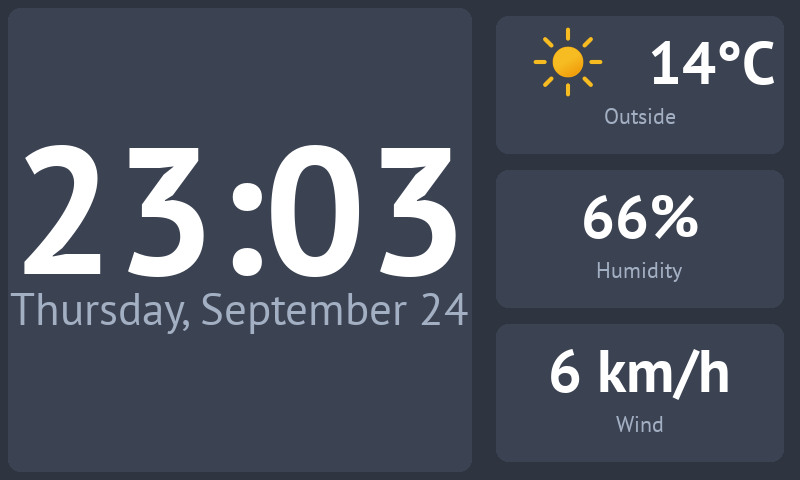
Magic! Here's how the icon gets picked:
data_pathdigs out the code, like"113".jq_expressionruns on whateverdata_pathfound, which jq calls., and glues it between a directory and an extension:file://images/weather/113.svg. The path is relative to the directory you're running Grydgets from.preserve_aspect_ratio: truekeeps the icon from being stretched to the shape of its cell.
Codes without an icon
If wttr.in ever sends a code you don't have a file for, the log will show a File not found warning, and the
widget will keep showing whatever icon it had before, or nothing at all if it hasn't loaded one yet. Setting
fallback_image gives it something to show at startup, but it won't replace an icon that's already on screen.
The sun comes out at night
wttr.in uses 113 for clear nights as well as sunny days, so after dark the icon will still be a sun.
3. Tomorrow's forecast in the evening
By the evening, today's forecast isn't very useful anymore. A scheduleflip is a container that shows one of its
children at a time, picked by the time of day, so it can show today's forecast until 6 PM and tomorrow's after that.
It needs somewhere to live first. The forecast goes in a new panel under the clock, which means the left column becomes a grid of its own: the clock on top, and a strip at the bottom with two halves. The forecast goes in the left half now, and step 4 will fill the right one.
Replace everything from widgets: down to the start of the right-hand grid with this:
widgets:
  - widget: grid
    rows: 1
    columns: 2
    column_ratios: [3, 2]
    children:
      - widget: grid
        rows: 2
        columns: 1
        padding: 8
        row_ratios: [2, 1]
        widget_background_color: '#3b4252'
        widget_corner_radius: 12
        children:
          - widget: dateclock
            date_color: '#a3afc2'

          - widget: grid
            rows: 1
            columns: 2
            children:
              - widget: scheduleflip
                schedule:
                  "00:00": forecast-today
                  "18:00": forecast-tomorrow
                children:
                  - widget: label
                    name: forecast-today
                    text: 'Today'
                    position: below
                    text_size: 22
                    color: '#a3afc2'
                    children:
                      - widget: grid
                        rows: 1
                        columns: 2
                        padding: 0
                        children:
                          - widget: providerimage
                            providers: [weather]
                            data_path: 'weather[0].hourly[4].weatherCode'
                            jq_expression: '"file://images/weather/" + . + ".svg"'
                            preserve_aspect_ratio: true
                          - widget: provider
                            providers: [weather]
                            data_path: 'weather[0]'
                            jq_expression: '"\(.maxtempC)° / \(.mintempC)°"'
                            text_size: 40

                  - widget: label
                    name: forecast-tomorrow
                    text: 'Tomorrow'
                    position: below
                    text_size: 22
                    color: '#a3afc2'
                    children:
                      - widget: grid
                        rows: 1
                        columns: 2
                        padding: 0
                        children:
                          - widget: providerimage
                            providers: [weather]
                            data_path: 'weather[1].hourly[4].weatherCode'
                            jq_expression: '"file://images/weather/" + . + ".svg"'
                            preserve_aspect_ratio: true
                          - widget: provider
                            providers: [weather]
                            data_path: 'weather[1]'
                            jq_expression: '"\(.maxtempC)° / \(.mintempC)°"'
                            text_size: 40

              - widget: empty

      - widget: grid
        rows: 3
        # ... the right-hand grid with the three readouts, as before
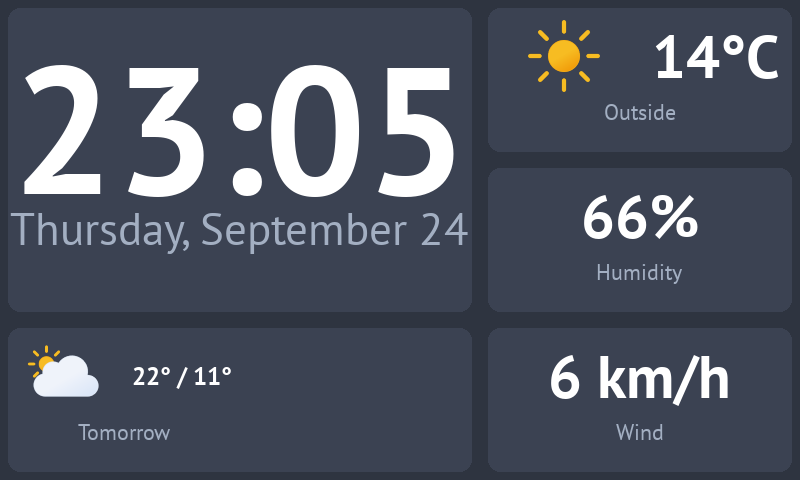
There's a fair bit going on here, so let's start with the layout:
- The outer grid doesn't have
paddinganymore. The two grids inside it leave a gap around each of their own panels, and if the outer grid did the same, the space around the edges and between the two columns would be twice as wide as the space between panels. - The new left-hand grid paints the panels behind both of its rows, so the clock doesn't need its own
background_colorandcorner_radius. - The strip at the bottom is a grid without padding or background, so both of its halves share the one panel.
emptydoesn't draw anything. It holds the right half until step 4.
Then the scheduleflip itself. schedule maps a time to the name of the child to show from that time on:
forecast-today from midnight, and forecast-tomorrow from 6 PM. The last entry of the day runs until the first one
the next day, so at midnight tomorrow's forecast becomes today's. The times are in whatever timezone the machine
running Grydgets is set to. When it's time to switch, the children slide past each other, and you can change that
with transition and ease, the same as on a flip.
The two children only differ in which day they read. wttr.in's weather list has one entry per day, starting
today, so weather[0] is today and weather[1] is tomorrow:
- The daily entries don't have a
weatherCodeof their own, but each one has anhourlylist with a forecast every three hours, starting at midnight.hourly[4]is the one for noon, which is a decent picture of what the day will be like. "\(.maxtempC)° / \(.mintempC)°"uses jq's string interpolation: anything inside\( )gets replaced with its value, so this comes out as22° / 11°.
Backslashes in YAML
The jq expression is in single quotes on purpose: YAML leaves backslashes alone inside single quotes. In double
quotes you'd have to write every \( as \\(.
4. Only mention rain when it's coming
A providerflip is another container that shows one of its children at a time. It picks the child based on a value
from a provider, so the right half of the strip can show the chance of rain when it's worth knowing about, and a
simple "No rain today" when it isn't.
Replace - widget: empty with this:
              - widget: providerflip
                providers: [weather]
                jq_expression: 'if ([.weather[0].hourly[].chanceofrain | tonumber] | max) >= 40 then "rain" else "dry" end'
                default_widget: no-rain
                mapping:
                  rain: rain-chance
                  dry: no-rain
                children:
                  - widget: label
                    name: rain-chance
                    text: 'Chance of rain'
                    position: below
                    text_size: 22
                    color: '#a3afc2'
                    children:
                      - widget: provider
                        providers: [weather]
                        jq_expression: '[.weather[0].hourly[].chanceofrain | tonumber] | max'
                        format_string: '{value}%'
                        text_size: 60

                  - widget: text
                    name: no-rain
                    text: 'No rain today'
                    align: center
                    vertical_align: center
                    text_size: 30
"No rain today" is a plain text widget, which doesn't have a font default yet, so add one to the theme block at
the top:
theme:
  defaults:
    # ... dateclock, provider and label as before
    text:
      font_path: fonts/PTSans-Bold.ttf
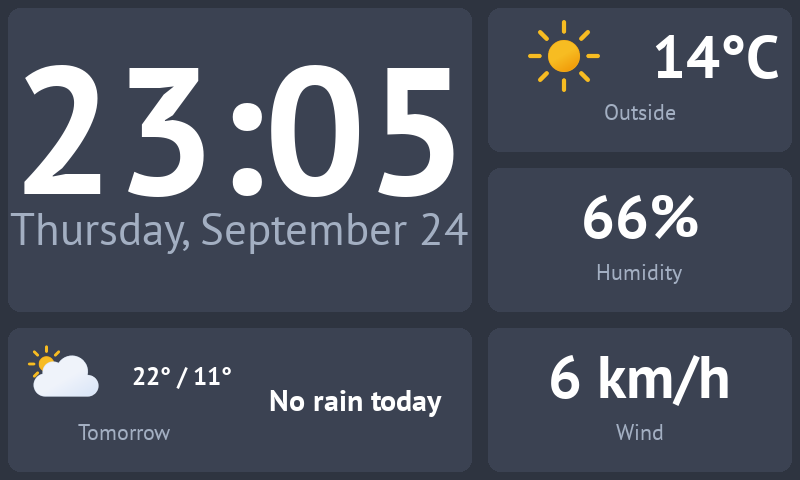
The trick is in how the flip decides:
jq_expressionboils the whole forecast down to one word..weather[0].hourly[].chanceofraingets the chance of rain for each of today's eight slots. wttr.in sends them as strings, sotonumberturns them into numbers, andmaxkeeps the highest one. If that's 40% or more, the result israin, and otherwise it'sdry.mappingmatches that word to thenameof a child:rainshowsrain-chance, anddryshowsno-rain.default_widgetis the child shown at startup, before the provider has any data, and whenever the value doesn't match anything inmapping.
The rain-chance child runs the same max again to show the number itself, since the flip only passes a word
along, not the data behind it.
Note that this looks at the whole of today, including the hours that have already gone by. So after 6 PM, the
forecast on the left is about tomorrow while the rain on the right is still about today. If that bothers you, the
rain half can become a scheduleflip of its own, with a providerflip for each day inside it.
The finished widgets.yaml
theme:
  defaults:
    dateclock:
      time_font_path: fonts/PTSans-Bold.ttf
      date_font_path: fonts/PTSans-Regular.ttf
    provider:
      font_path: fonts/PTSans-Bold.ttf
    label:
      font_path: fonts/PTSans-Regular.ttf
    text:
      font_path: fonts/PTSans-Bold.ttf

background_color: '#2e3440'

widgets:
  - widget: grid
    rows: 1
    columns: 2
    column_ratios: [3, 2]
    children:
      - widget: grid
        rows: 2
        columns: 1
        padding: 8
        row_ratios: [2, 1]
        widget_background_color: '#3b4252'
        widget_corner_radius: 12
        children:
          - widget: dateclock
            date_color: '#a3afc2'

          - widget: grid
            rows: 1
            columns: 2
            children:
              - widget: scheduleflip
                schedule:
                  "00:00": forecast-today
                  "18:00": forecast-tomorrow
                children:
                  - widget: label
                    name: forecast-today
                    text: 'Today'
                    position: below
                    text_size: 22
                    color: '#a3afc2'
                    children:
                      - widget: grid
                        rows: 1
                        columns: 2
                        padding: 0
                        children:
                          - widget: providerimage
                            providers: [weather]
                            data_path: 'weather[0].hourly[4].weatherCode'
                            jq_expression: '"file://images/weather/" + . + ".svg"'
                            preserve_aspect_ratio: true
                          - widget: provider
                            providers: [weather]
                            data_path: 'weather[0]'
                            jq_expression: '"\(.maxtempC)° / \(.mintempC)°"'
                            text_size: 40

                  - widget: label
                    name: forecast-tomorrow
                    text: 'Tomorrow'
                    position: below
                    text_size: 22
                    color: '#a3afc2'
                    children:
                      - widget: grid
                        rows: 1
                        columns: 2
                        padding: 0
                        children:
                          - widget: providerimage
                            providers: [weather]
                            data_path: 'weather[1].hourly[4].weatherCode'
                            jq_expression: '"file://images/weather/" + . + ".svg"'
                            preserve_aspect_ratio: true
                          - widget: provider
                            providers: [weather]
                            data_path: 'weather[1]'
                            jq_expression: '"\(.maxtempC)° / \(.mintempC)°"'
                            text_size: 40

              - widget: providerflip
                providers: [weather]
                jq_expression: 'if ([.weather[0].hourly[].chanceofrain | tonumber] | max) >= 40 then "rain" else "dry" end'
                default_widget: no-rain
                mapping:
                  rain: rain-chance
                  dry: no-rain
                children:
                  - widget: label
                    name: rain-chance
                    text: 'Chance of rain'
                    position: below
                    text_size: 22
                    color: '#a3afc2'
                    children:
                      - widget: provider
                        providers: [weather]
                        jq_expression: '[.weather[0].hourly[].chanceofrain | tonumber] | max'
                        format_string: '{value}%'
                        text_size: 60

                  - widget: text
                    name: no-rain
                    text: 'No rain today'
                    align: center
                    vertical_align: center
                    text_size: 30

      - widget: grid
        rows: 3
        columns: 1
        padding: 8
        widget_background_color: '#3b4252'
        widget_corner_radius: 12
        children:
          - widget: label
            text: 'Outside'
            position: below
            text_size: 22
            color: '#a3afc2'
            children:
              - widget: grid
                rows: 1
                columns: 2
                padding: 0
                children:
                  - widget: providerimage
                    providers: [weather]
                    data_path: 'current_condition[0].weatherCode'
                    jq_expression: '"file://images/weather/" + . + ".svg"'
                    preserve_aspect_ratio: true
                  - widget: provider
                    providers: [weather]
                    data_path: 'current_condition[0].temp_C'
                    format_string: '{value}°C'
                    text_size: 60

          - widget: label
            text: 'Humidity'
            position: below
            text_size: 22
            color: '#a3afc2'
            children:
              - widget: provider
                providers: [weather]
                data_path: 'current_condition[0].humidity'
                format_string: '{value}%'
                text_size: 60

          - widget: label
            text: 'Wind'
            position: below
            text_size: 22
            color: '#a3afc2'
            children:
              - widget: provider
                providers: [weather]
                data_path: 'current_condition[0].windspeedKmph'
                format_string: '{value} km/h'
                text_size: 60
What to read next
- Theming.
'#a3afc2'is now written out seven times, and a theme token lets you write it once. - Data extraction, for more on
data_pathand jq. httpflipworks likeproviderflipbut makes its own request, which is simpler when only one widget needs the answer.providerbarchartcould draw the chance of rain for every slot of the day as a bar chart, instead of just the highest one.